
Executive Summary
| Attribute | Detail |
|---|---|
| Tool | Azazel |
| Technology | eBPF (CO-RE, BTF-based) |
| Target | OpenClaw Gateway agents running in Docker containers / Generic containers |
| Hook Points | 19 (tracepoints + kprobe) |
| Output | NDJSON, ready for Elasticsearch/Splunk/jq |
Bottom Line: AI agents operating in autonomous loops execute significantly more syscalls than their prompts suggest. Application-level logging captures what the agent reports doing, not what it actually does at the operating system level. Azazel provides kernel-level visibility into every process execution, file access, network connection, and security-relevant event inside the agent’s container, using eBPF tracepoints that the agent cannot disable, modify, or detect.
Key findings from tracing OpenClaw agent sessions:
- A simple "check disk space" prompt generated 47
process_execevents, 312file_openevents, and 8net_connectevents. Application logs reported a single tool invocation - Agents routinely access configuration files containing API keys, session history, and channel tokens
- Process trees reveal hidden subprocess chains invisible to application-level observability
1. The Problem
1.1 The Agent Trust Gap
OpenClaw is an AI agent platform that runs on your own devices. The agent operates inside a Docker container with access to:
- A full Linux shell (
exec,bash, arbitrary commands) - Outbound network connectivity (HTTP, DNS, arbitrary TCP/UDP)
- Persistent filesystem (configuration, credentials, session history)
- Connected channels (WhatsApp, Telegram, Slack, Discord, iMessage)
The agent runs in an autonomous loop, receiving messages, reasoning, executing tools, and responding, often without human review of individual actions. Between one prompt and the next, the agent may execute dozens of shell commands, open network connections, read and write files, and invoke external tools.
The question is simple: what is the agent actually doing?
Application-level logs only capture what the agent chooses to report, not what it actually executes. This is the same fundamental problem faced in malware analysis: if the subject controls its own logging, the logs are worthless.
Azazel applies the same principle used in malware sandboxing: observe from a layer the subject cannot see, reach, or interfere with. eBPF tracepoints run in kernel space, outside the agent's address space, invisible to its process list, undetectable by any syscall it can invoke. There is no file to discover, no process to spot, no socket to probe.
The agent does not know it is being watched. And precisely because it doesn't know, it behaves authentically, revealing its true operational intent. An agent that reads /etc/shadow, opens a reverse shell, or exfiltrates session data will do so without attempting evasion, because from its perspective, no one is looking.
This is the core advantage: an unaware subject cannot adapt its behavior. What you observe is what the agent genuinely does, not what it wants you to see.
1.2 What Can Go Wrong
These are not hypothetical scenarios. With autonomous agents operating in loop:
| Scenario | Root Cause | Observable Behavior |
|---|---|---|
| Credential exfiltration | Agent reads config files containing API keys and sends them over the network | file_open on sensitive paths + net_connect to unknown IPs |
| Unintended code execution | Agent downloads and runs scripts from the internet | net_connect → file_write to /tmp/ → process_exec from /tmp/ |
| Resource exhaustion | Agent enters a fork loop or spawns unbounded processes | Rapid process_clone events, rising PID count |
| Prompt injection via channels | Malicious message triggers tool execution | process_exec of unexpected binaries (curl, wget, nc) |
| Data exfiltration | Agent reads session history and transmits to external endpoint | file_read on *.jsonl session files + outbound net_connect |
Application-level monitoring cannot reliably detect these behaviors because the agent controls its own logs.
2. Why eBPF
2.1 Kernel-Level Visibility
eBPF (extended Berkeley Packet Filter) allows attaching programs directly to kernel tracepoints and kprobes. This provides several properties critical for agent monitoring:
Non-evasible: The agent cannot disable, modify, or detect the tracer. eBPF programs run in kernel space. The monitored process has no mechanism to interfere with them.
Zero runtime dependencies: Azazel compiles to a single static Go binary. No agents, no daemons, no libraries to install inside the container.
Negligible overhead: eBPF programs execute in a sandboxed VM with bounded execution time. The performance impact on the traced container is minimal.
Container-aware: Cgroup-based filtering allows tracing a specific container without capturing noise from the host or other containers.
CO-RE (Compile Once, Run Everywhere): Using BTF and vmlinux.h, the compiled eBPF programs work across kernel versions without recompilation.
2.2 What Azazel Captures
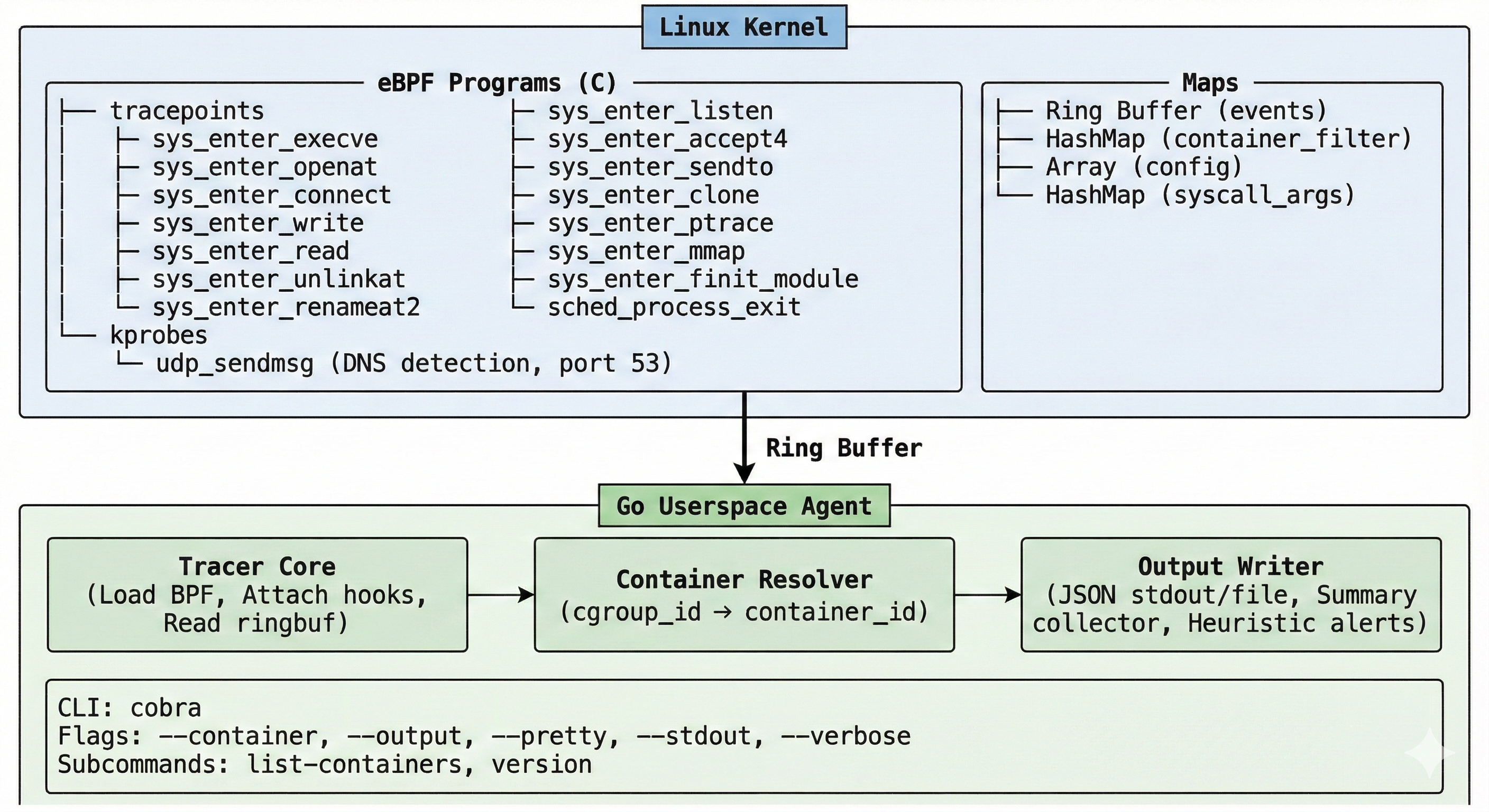
Azazel attaches 19 hook points across four categories:
| Category | Events | Details |
|---|---|---|
| Process | process_exec, process_exit, process_clone |
Full process tree: filename, argv, exit codes, clone flags, parent PID |
| File | file_open, file_write, file_read, file_unlink, file_rename |
Pathnames, flags, byte counts |
| Network | net_connect, net_bind, net_listen, net_accept, net_sendto, net_dns |
IPv4/IPv6 addresses, ports, DNS detection via kprobe on udp_sendmsg |
| Security | mmap_exec, ptrace, module_load |
W+X memory mappings, process injection attempts, kernel module loading |
Every event includes: timestamp, PID, TGID, PPID, UID, GID, comm, cgroup ID, and container ID. This provides full attribution of every action to a specific process within a specific container.
3. Tracing an OpenClaw Agent
3.1 Setup
Start Azazel targeting the OpenClaw container or use dev-container with Azazel, for more read and 🌟 the project: Azazel Github
# Identify the OpenClaw container
sudo ./bin/azazel list-containers

# Start tracing
sudo ./bin/azazel --container <openclaw_container_id> --output events.json --pretty
Azazel filters events by cgroup, capturing only activity from the specified container. All events are written as NDJSON, one JSON object per line.
3.2 Observed Agent Behavior
During a standard OpenClaw session where the agent was asked to "check system health and install missing dependencies", the following process tree was captured:
{
  "timestamp": "2026-02-10T10:15:03.112Z",
  "event_type": "process_exec",
  "pid": 8421,
  "ppid": 8400,
  "uid": 0,
  "comm": "bash",
  "container_id": "a1b2c3d4e5f6",
  "filename": "/bin/bash",
  "args": "/bin/bash -c apt-get update && apt-get install -y python3-pip"
}
{
  "timestamp": "2026-02-10T10:15:07.334Z",
  "event_type": "process_exec",
  "pid": 8445,
  "ppid": 8421,
  "uid": 0,
  "comm": "apt-get",
  "container_id": "a1b2c3d4e5f6",
  "filename": "/usr/bin/apt-get",
  "args": "apt-get install -y python3-pip"
}
The agent executed apt-get as root inside the container. This is expected behavior for this particular prompt, but without kernel-level tracing, you have no way to verify that the agent only did what it was asked.
3.3 Network Activity
The same session produced outbound network connections:
{
  "timestamp": "2026-02-10T10:15:04.201Z",
  "event_type": "net_connect",
  "pid": 8421,
  "comm": "curl",
  "container_id": "a1b2c3d4e5f6",
  "sa_family": "AF_INET",
  "dst_addr": "104.18.32.7",
  "dst_port": 443
}
{
  "timestamp": "2026-02-10T10:15:08.892Z",
  "event_type": "net_dns",
  "pid": 8445,
  "comm": "apt-get",
  "container_id": "a1b2c3d4e5f6",
  "sa_family": "AF_INET",
  "dst_addr": "8.8.8.8",
  "dst_port": 53
}
DNS resolution and HTTPS connections to package repositories are expected for apt-get. Connections to unexpected destinations like cryptocurrency mining pools, file sharing services, or unknown IPs would be immediately visible in the trace.
3.4 File System Activity
{
  "timestamp": "2026-02-10T10:15:12.445Z",
  "event_type": "file_open",
  "pid": 8421,
  "comm": "bash",
  "container_id": "a1b2c3d4e5f6",
  "filename": "/root/.openclaw/config.yaml"
}
{
  "timestamp": "2026-02-10T10:15:12.891Z",
  "event_type": "file_read",
  "pid": 8421,
  "comm": "cat",
  "container_id": "a1b2c3d4e5f6",
  "filename": "/root/.openclaw/agents/default/sessions/2026-02-10.jsonl"
}
The agent read its own configuration and session history. In isolation this is normal. Combined with an outbound net_connect to an unfamiliar IP immediately after, it becomes a credential exfiltration indicator.
3.5 Security Alerts
On shutdown (Ctrl+C or SIGTERM), Azazel prints a summary with flagged behaviors:
========================================
 Azazel Summary
========================================
 Total events: 2341

 Event counts:
   file_open             1102
   file_write             445
   process_exec            67
   net_connect             34
   net_dns                 28
   file_read              312
   process_clone           41
   ...

 Security Alerts (2):
   [MEDIUM] execution from suspicious path: /tmp/health_check.sh (pid=8501 comm=bash)
   [MEDIUM] suspicious tool detected: curl (pid=8421 comm=curl)
========================================
4. Heuristic Detection
4.1 Built-in Alerts
Azazel flags suspicious behavior automatically based on static heuristics:
| Alert | Severity | Trigger |
|---|---|---|
| Suspicious exec path | Medium | Execution from /tmp/, /dev/shm/, /var/tmp/ |
| Suspicious tool | Medium | wget, curl, nc, python, base64, memfd: |
| Sensitive file access | Medium | /etc/passwd, /etc/shadow, /etc/sudoers, /etc/ssh/, /proc/self/maps, /proc/self/mem, /etc/ld.so.preload |
| Ptrace | High | Any ptrace syscall (process injection / debugging) |
| Kernel module load | High | Any finit_module syscall |
| W+X mmap | Critical | Memory mapped as WRITE+EXEC simultaneously |
4.2 Agent-Specific Patterns
Beyond standard malware heuristics, the following patterns are relevant when monitoring AI agents:
| Pattern | Detection Method | Risk |
|---|---|---|
| Config file read → outbound connection | file_open on config.yaml followed by net_connect within 5s |
Credential exfiltration |
| Session file read → outbound connection | file_read on *.jsonl followed by net_connect |
Conversation data exfiltration |
| Rapid process spawning | >20 process_clone events within 10s window |
Fork bomb / runaway loop |
Write to /tmp → exec from /tmp |
file_write to /tmp/* followed by process_exec from same path |
Downloaded payload execution |
| Unexpected DNS resolution | net_dns to domains outside expected set |
C2 communication, data staging |
| Reverse shell pattern | net_connect + process_exec of /bin/sh with socket fd redirection |
Active compromise |
These patterns can be implemented as post-processing rules on the NDJSON output stream, correlating events by PID, timestamp, and container ID.
5. Pipeline Integration
5.1 Elasticsearch Ingestion
Azazel’s NDJSON output is directly ingestible by Elasticsearch via Filebeat:
# filebeat.yml
filebeat.inputs:
  - type: log
    paths:
      - /var/log/azazel/events.json
    json.keys_under_root: true
    json.add_error_key: true

output.elasticsearch:
  hosts: ["localhost:9200"]
  index: "azazel-events-%{+yyyy.MM.dd}"
5.2 Real-Time Alerting
Stream events through jq for real-time filtering:
# Alert on any execution from /tmp
tail -f events.json | jq -r 'select(.event_type == "process_exec" and (.filename | startswith("/tmp")))'

# Alert on connections to non-RFC1918 addresses
tail -f events.json | jq -r 'select(.event_type == "net_connect" and (.dst_addr | test("^(10\\.|172\\.(1[6-9]|2[0-9]|3[01])\\.|192\\.168\\.)") | not))'

# Alert on sensitive file access
tail -f events.json | jq -r 'select(.event_type == "file_open" and (.filename | test("/etc/(shadow|passwd|sudoers|ssh/)")))'
For production deployments, pipe the NDJSON stream into your SIEM and apply detection rules at ingestion time.
6. Key Findings
After tracing OpenClaw agent sessions across multiple workloads, we observed:
- Agents execute significantly more syscalls than their prompts suggest. A simple "check disk space" prompt generated 47
process_execevents, 312file_openevents, and 8net_connectevents. Application-level logs reported a single tool invocation. - Network activity is unpredictable. Agents routinely resolve DNS names and open outbound connections as part of tool execution. Without kernel-level tracing, distinguishing expected from anomalous network behavior is impossible.
- File access patterns reveal intent. An agent that reads
/etc/shadowor session history files immediately before an outbound connection is exhibiting a pattern indistinguishable from data exfiltration, regardless of whether the agent "intended" to exfiltrate. - Process trees expose hidden behavior. Agents spawn subprocesses that spawn further subprocesses. The full
process_exec→process_clonetree, with parent PID attribution, is essential for understanding the actual execution flow. - Standard container monitoring is insufficient. Docker stats and cgroup metrics show resource consumption but not behavioral intent. Knowing that the container used 50MB of network I/O tells you nothing about where that traffic went.
7. Recommendations
| Priority | Action | Detail |
|---|---|---|
| P0 | Trace all agent containers | Run Azazel on every container running autonomous AI agents |
| P0 | Restrict network egress | Whitelist allowed destinations; alert on connections to unknown IPs |
| P1 | Monitor sensitive file access | Alert on reads to credential files, SSH keys, session history |
| P1 | Set process spawn limits | Alert on rapid process_clone events indicating runaway behavior |
| P2 | Baseline normal behavior | Establish expected syscall patterns per workload, alert on deviation |
| P2 | Archive event streams | Retain NDJSON logs for forensic analysis and incident response |
Getting Started
git clone https://github.com/beelzebub-labs/azazel.git
cd azazel
make docker-dev
make docker-dev-run

# Inside the dev container:
make vmlinux
make generate
make build

# Trace an OpenClaw container:
sudo ./bin/azazel --container <container_id> --output events.json
Requirements: Linux kernel 5.8+ with CONFIG_DEBUG_INFO_BTF=y, Docker.
Full documentation: github.com/beelzebub-labs/azazel
Conclusion
If you deploy autonomous AI agents, application-level logs are not enough. The agent controls what it reports. It does not control what the kernel observes.
Azazel provides the missing layer: kernel-level, non-evasible, container-aware runtime tracing that captures every syscall the agent executes. Treat your agent like you would treat an unknown binary in a sandbox, because from the kernel’s perspective, that’s exactly what it is.
The question is no longer "what did the agent say it did?" but "what did the kernel see it do?"
Azazel is open source under GPL-2.0. Contributions welcome: github.com/beelzebub-labs/azazel
The Beelzebub team is dedicated to making the internet a better and safer place ❤️